
Overview
We are excited to introduce the highlights of Intel® Core™ Ultra Series 3 processors and the advancements we have made in PyTorch to enable users to unlock a wider range of AI scenarios on PC and edge computing.
Intel® Core™ Ultra Series 3 processors with Arc B-series GPU
The latest Intel® Core™ Ultra Series 3 processors feature a series of improvements to boost AI capabilities and performance of mobile PCs and edge systems, including a larger integrated GPU:
- New Xe3 architecture
- Up 12 Xe-cores GPU configuration
- Up to 96 XMX AI engines offering up to 120 TOPs
- Up to 96GB of fast LPDDR5x-9600
The combination of dense matrix multiplication capabilities in the GPU with access to full system memory bandwidth gives Intel® Core™ Ultra Series 3 processors unique capabilities in the segment to run larger models and larger contexts.
PyTorch Features to unlock AI Capabilities
To allow users to easily unlock AI capabilities on Intel® Platforms, PyTorch 2.10 delivers a comprehensive feature set designed for both efficiency and flexibility with XPU backend. We highlight two key pillars of this release: Faster development cycle and improved inference performance with TorchAO and Advanced Extensibility with SYCL.
PyTorch + TorchAO: The “Out-of-the-Box” Experience
For developers seeking immediate performance gains and ease of use, PyTorch 2.10 combines native optimizations with TorchAO which is helping with quantization to fit bigger models to ensure a seamless experience on Intel® Core™ Ultra Series 3 processors:
- Unified Experience: Users enjoy the same consistent PyTorch experience on Intel XPU as on other GPU platforms.
- Comprehensive Support:
- Rich Ecosystem: Native support for a broad range of operating systems and operators.
- Data Types: Full support for popular data types including int4, int8, fp8, float16, bfloat16, and float32.
- Library Integration: Intel® Core™ Ultra Series 3 processors are supported by PyTorch 2.10 to allow users to run models from standard libraries like Hugging Face Transformers, Diffusers, and LeRobot directly.
- Performance Acceleration: High-performance libraries are integrated to speed up bottleneck operators like Linear layers and SDPA (Scaled Dot Product Attention).
Quick Example: LLM Inference with TorchAO
Installation & Quick Start
Install Intel® GPU Driver
To enable Intel® GPU acceleration, begin by installing the latest graphics driver: Windows users should download the driver from the Intel Arc & Iris Xe Graphics Driver page and follow the on-screen installation instructions. Ubuntu users should refer to the Intel GPU Driver Installation guide for OS-specific setup steps.
Install PyTorch and other required packages

# Install PyTorch with XPU support
pip install torch==2.10.0 torchvision==0.25.0 torchaudio==2.10.0 --index-url https://download.pytorch.org/whl/xpu

# Install TorchAO
pip install --pre torchao==0.16.0* --index-url https://download.pytorch.org/whl/nightly/xpu
LLM Inference with TorchAO
With the environment set up, optimizing and running LLMs on Intel® Core™ Ultra Series 3 processors is straightforward. PyTorch 2.10 combined with TorchAO allows you to apply advanced quantization techniques like Int4-weight-only quantization with just a few lines of code. Here is a minimal example showing how to run a Llama model:
import torch
from transformers import AutoModelForCausalLM, TorchAoConfig
from torchao.quantization import Int4WeightOnlyConfig

# Use Meta Llama 3.1 8B Instruct model
model_id = "meta-llama/Meta-Llama-3.1-8B-Instruct"

# --- 1. Create Quantization Configuration ---
# Configure Int4 Weight-Only Quantization for XPU
quant_config = Int4WeightOnlyConfig(
    group_size=128,
    int4_packing_format="plain_int32"
)
quantization_config = TorchAoConfig(quant_config)

# --- 2. Load and Automatically Quantize ---
model = AutoModelForCausalLM.from_pretrained(
    model_id,
    device_map="xpu",
    torch_dtype=torch.float16,
    quantization_config=quantization_config,
)
For more advanced usage and comprehensive examples, please check out the TorchAO repository.
AI PCs and Edge devices are at the forefront of delivering AI experiences designed to assist users while remaining personalized and private. The below table showcases impressive inference latency on the top language models designed for the local device1.
| Model (HF id) | Metrics | int4a16 (torch.compile) |
| Qwen/Qwen3-0.6B | First token latency (ms) | 58.11 |
| 2+ token latency (ms) | 14.84 | |
| Qwen/Qwen3-1.7B | First token latency (ms) | 119.43 |
| 2+ token latency (ms) | 20.61 | |
| Qwen/Qwen3-4B | First token latency (ms) | 276.16 |
| 2+ token latency (ms) | 33.54 | |
| microsoft/Phi-4-mini-instruct | First token latency (ms) | 293.89 |
| 2+ token latency (ms) | 32.89 | |
| microsoft/Phi-4-mini-reasoning | First token latency (ms) | 293.39 |
| 2+ token latency (ms) | 33.14 | |
| meta-llama/Llama-3.2-3B-Instruct | First token latency (ms) | 242.29 |
| 2+ token latency (ms) | 27.24 | |
| deepseek-ai/DeepSeek-R1-Distill-Llama-8B | First token latency (ms) | 545.76 |
| 2+ token latency (ms) | 49.9 | |
| google/gemma-2-2b-it | First token latency (ms) | 212.86 |
| 2+ token latency (ms) | 29.24 | |
| mistralai/Mistral-7B-Instruct-v0.2 | First token latency (ms) | 513.32 |
| 2+ token latency (ms) | 42.55 |
SYCL Custom Operators: Advanced Extensibility on Windows & Linux
For developers who need to go beyond standard operators and seek performance through customization, PyTorch 2.10 significantly expands its extensibility capabilities.
- Cross-Platform Support: We have extended the support for custom operators using SYCL from Linux to Windows.
- Domain-Specific Kernels: This feature empowers developers to write and integrate high-performance, domain-specific kernels directly on Intel® GPUs via the PyTorch CPP Extension API.
- Seamless Integration: This allows for deep customization of operators to unlock specific hardware capabilities of Intel® Core™ Ultra Series 3 processors.
For a step-by-step guide, please refer to the tutorial: Custom C++ and CUDA Extensions
User Scenario Showcases on Intel® Core™ Ultra Series 3
Edge Scenarios: Vision and Robotics Use-Cases
Edge computing on Intel® Core™ Ultra Series 3 processors leverages the integrated Intel® Arc™ graphics to move latency-sensitive AI from the cloud to the local perimeter. For industrial and robotics applications, PyTorch 2.10 provides a unified XPU backend that enables you to enhance your inference throughput with minimal code changes.
Visual Inspection with Anomalib
In modern manufacturing, visual inspection is crucial for quality control. Detecting subtle defects in real-time requires high-precision models that can process high-resolution sensor data without latency. By using Anomalib, developers can quickly train and deploy automated inspection pipelines on industrial PCs powered by Intel® Core™ Ultra Series 3 processors with integrated Intel® Arc™ graphics.
Here is an example how Anomalib can be used with PyTorch 2.10 on Intel® Core™ Ultra Series 3 processors:
Install Anomalib
In your python virtual environment, install torch and anomalib :

pip install torch torchvision --index-url https://download.pytorch.org/whl/xpu

pip install anomalib
The Anomalib API: Simple, Clean, No Boilerplate
One of Anomalib’s standout features is its elegantly simple API without endless boilerplate. Thanks to this, training a production-ready anomaly detection model takes just a few lines of code.
Here’s how you can train a well-known anomaly detection model-Patchcore , to detect defects in transistors on Intel® Core™ Ultra Series 3 processor’s iGPU:
from anomalib.data import MVTecAD
from anomalib.engine import Engine, SingleXPUStrategy, XPUAccelerator
from anomalib.models import Patchcore

# Initialize components
datamodule = MVTecAD(category="transistor")
model = Patchcore()
engine = Engine(
    strategy=SingleXPUStrategy(),
    accelerator=XPUAccelerator(),
)
# Train the model
engine.train(datamodule=datamodule, model=model)
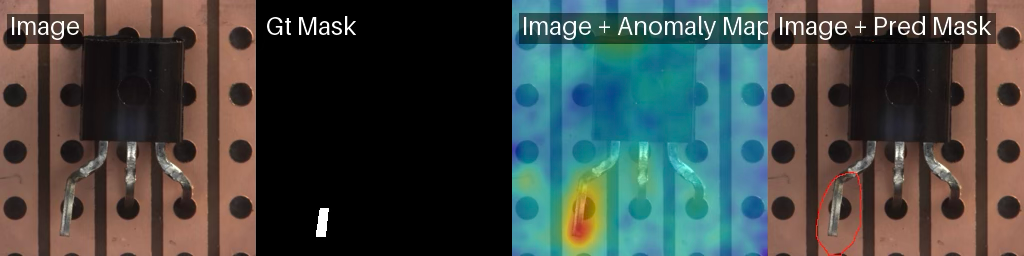
Less than 10 lines of code to train and test an anomaly detection model.
Benchmark numbers
We benchmarked several Anomalib models on Intel® Core™ Ultra Series 2 and Intel® Core™ Ultra Series 3 processors to see how the latest generation stacks up. For models that support fine-tuning (such as STFPM, FastFlow, and Patchcore), we trained the models for 20 epochs – enough to achieve solid detection accuracy. For feature-extraction based models like PaDiM and DFKDE, the “training” is essentially a single-pass feature extraction and fitting the distribution of “normal” images.
The below graph shows the time taken to train anomaly detection models on Intel® Core™ Ultra 7 Processor 265H and Intel® Core™ Ultra X9 Processor 388H2.
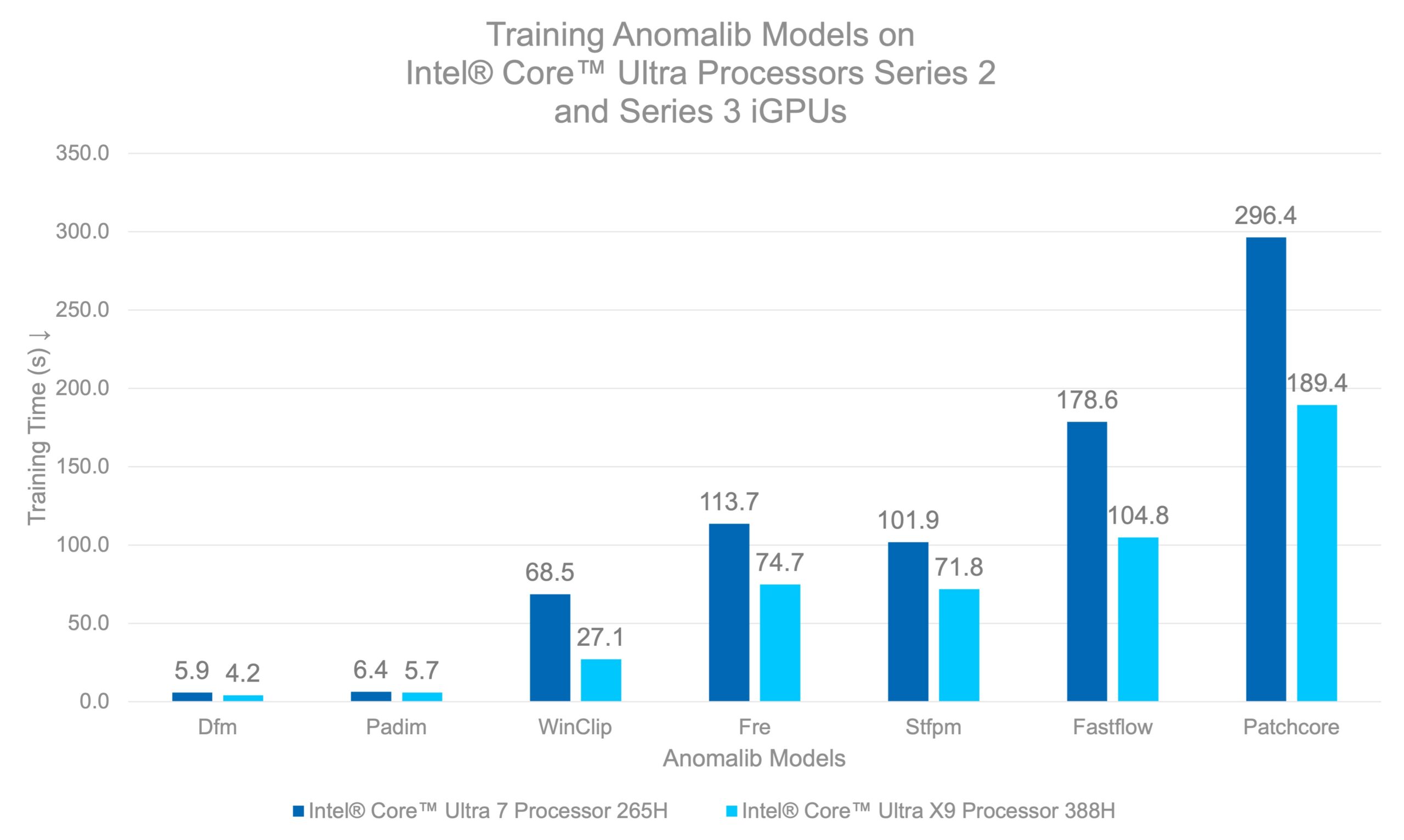
Caption: Intel® Core™ Ultra X9 Processor 388H achieves 1.4x to 1.7x faster training for most models, with WinClip seeing the largest gain at 2.5× compared to Intel® Core™ Ultra 7 Processor 265H.
This means you can train a production-ready defect detection model in less time than it takes to grab a cup of coffee. What makes these results even more compelling is where they were achieved—on an integrated GPU built into a laptop processor. No bulky discrete GPUs, no dedicated AI accelerators, no data center infrastructure.
This matters for industrial deployments where power consumption, data confidentiality and form factor are critical. Intel® Core™ Ultra Series 3 processors’ iGPUs sip power compared to discrete GPUs while still delivering the performance needed for practical anomaly detection workloads. Train at the edge, deploy at the edge—all on hardware that fits in your hands.
Robotics with LeRobot
Beyond static inspection, Intel® Core™ Ultra Series 3 processors enable more dynamic robotic use-cases, such as autonomous manipulation and navigation. The XPU integration of the LeRobot library highlights the maturity of the software ecosystem for robotics.
Users can enable several models within the LeRobot library by simply updating the device configuration to XPU. The ability to run standard libraries like LeRobot and Hugging Face Transformers natively means developers can focus on robotic logic rather than infrastructure, which significantly reduces the effort required to start new projects.
Installation
The following script installs LeRobot with PushT gym requirements:
pip install lerobot[pusht]
We could run the following CLI command to train a diffusion policy on PushT task using XPU device option.
lerobot-train\
    --policy.device=xpu \
    --output_dir=outputs/train/diffusion_pusht_xpu \
    --policy.type=diffusion \
    --policy.push_to_hub=false \
    --dataset.repo_id=lerobot/pusht \
    --seed=100000 \
    --env.type=pusht \
    --batch_size=64 \
    --steps=100000 \
    --eval_freq=10000 \
    --save_freq=10000 \
Inference of any trained in LeRobot policy can be executed on XPU in similar fashion:
lerobot-eval \
    --policy.device=xpu \
    --policy.path=outputs/train/diffusion_pusht_xpu/ \
checkpoints/last/pretrained_model/ \
    --output_dir=outputs/eval/diffusion_pusht/ \
    --env.type=pusht \
    --eval.n_episodes=500 \
    --eval.batch_size=64 \
    --policy.use_amp=false
For those who prefer using API can achieve the same behaviour via LeRobot. More interested readers could refer to the LeRobot documentation for the specific details of the LeRobot API.
Summary
PyTorch 2.10 delivers a unified and high performance XPU experience on Intel® Core™ Ultra Series 3 processors, enabling developers to run inference, training, and creative AI workloads on AI PCs and edge devices with minimal code changes. With TorchAO providing out of the box low precision optimization and SYCL enabling advanced extensibility, popular ecosystems such as Hugging Face, Anomalib, gsplat, and LeRobot run natively and efficiently on integrated Intel GPUs.
These capabilities unlock a new class of workloads on Intel AIPCs—from LLM and VLM inference to industrial vision, robotics, and highfidelity 3D scene creation—previously limited to discrete GPUs or cloud infrastructure. Forfidelity 3D scene creation—previously limited to discrete GPUs or cloud infrastructure. ForIntel® Core™ Ultra Series 3 platforms, PyTorch 2.10 translates architectural advances in compute and memory into tangible developer value, positioning Intel AIPCs as a scalable, power efficient, and efficient, and developer foundation for friendly foundation for next generation AI applications at the PC and edge.
Notices and Disclaimers
Performance varies by use, configuration, and other factors. Learn more on the Performance Index site. Performance results are based on testing as of dates shown in configurations and may not reflect all publicly available updates. See backup for configuration details. No product or component can be absolutely secure. Your costs and results may vary. Intel technologies may require enabled hardware, software, or service activation.
No product or component can be absolutely secure. Your costs and results may vary.
Intel technologies may require enabled hardware, software or service activation.
© Intel Corporation. Intel, the Intel logo, and other Intel marks are trademarks of Intel Corporation or its subsidiaries. Other names and brands may be claimed as the property of others.
Performance results are based on testing as of February 2026.
- Processor: Intel(R) Core(TM) Ultra X9 388H; Memory: 32GB; Storage: 1TB; VGM: Default; Display Resolution: 1920×1080; OS: Microsoft Windows 11 Pro 26200.7623; Integrated Graphics Card: Intel® Arc™ B390 GPU; Integrated Graphics Driver: 101.8362; Lenovo Power Plan: Geek Performance; Windows Power Plan: Best Performance
- Processors : Intel® Core™ Ultra 7 Processor 265H and Intel® Core™ Ultra X9 Processor 388H; Memory: 16GB, OS: Ubuntu 24.04.3 LTS; Intel GPU Drivers (libze-intel-gpu1 and intel-opencl-icd): 25.40.35563.4-0; Python: 3.12.3; Libraries: PyTorch 2.10, Anomalib 2.2.0; Intel® Core™ Ultra X9 Processor 388H was tested on an Intel Reference Platform; Intel® Core™ Ultra 7 Processor 265H was tested on a Customer Reference Board; Both systems configured with TDP 65W and ‘Balanced Performance (6)’ Energy Performance Bias (reported by PerfSpect tool);
Workload: Comparison of time taken to fit/finetune anomaly detection models on Intel® Core™ Ultra Series processors’ iGPUs. Results averaged over 5 runs with slowest and fastest run excluded for fairness (MLPerf style). Torch dataloaders with batch_size of 8, with num_workers set to 4 are used for both devices.
AI disclaimer:
AI features may require software purchase, subscription, or enablement by a software or platform provider, or may have specific configuration or compatibility requirements. Details at www.intel.com/AIPC. Results may vary.