
The world of AI is expanding beyond the cloud, reaching devices that fit in the palm of your hand. Running PyTorch models on these tiny systems, where memory is measured in kilobytes, requires a new way of thinking. That’s where ExecuTorch, the lightweight runtime for edge inference, bridges the gap between familiar PyTorch workflows and low-power Arm-based microcontrollers, using optimizations such as quantization and graph compilation to make models efficient enough for the edge.
I recently built a Tiny Rock-Paper-Scissors (RPS) demo using PyTorch and ExecuTorch on the Arm Corstone-320 platform. The goal: take a small Convolutional Neural Network (CNN) trained in PyTorch and deploy it all the way to a simulated Arm microcontroller with an Arm Ethos-U NPU (via the Arm Fixed Virtual Platform (FVP)). Here’s what that journey looks like, and why it matters for anyone building at the edge.
Why PyTorch at the Edge?
PyTorch makes model experimentation fast and intuitive, but moving from the flexibility of dynamic graphs to the rigid constraints of embedded hardware isn’t trivial. Most microcontrollers have less than 1 MB of RAM and no operating system, so traditional Python inference is off the table.
ExecuTorch solves this by compiling PyTorch models into a compact, portable format (`.pte`) that runs on devices with minimal compute, power, and memory. During this process, weights and activations are quantized from floating-point to lower-precision integer formats (typically int8), dramatically reducing both memory footprint and compute costs while maintaining model accuracy. The computation graph is also flattened, fused, and optimized, removing redundant operations and enabling smooth execution at the edge. It extends the PyTorch ecosystem all the way down to the smallest Arm Cortex-M and Ethos-U-based systems.
From PyTorch to the Micro-Edge
The great news is, I have built a detailed learning path to guide you through an end-to-end TinyML EdgeAI pipeline.
The Tiny RPS Game
The course’s centerpiece is the Tiny RPS game. It’s a fun and approachable way to learn about TinyML, while showing that PyTorch workflows can scale down just as easily as they scale up. It is a minimal but complete AI workflow which:
- Generates its own dataset.
- Trains a CNN in PyTorch.
- Exports it via ExecuTorch.
- Deploys it to the FVP, no need for physical hardware.
- All you need is an x86 Linux host machine or VM running Ubuntu 22.04 or later.
The Pipeline
- Model Training in PyTorch
We define and train a compact CNN to classify synthetic images of “rock,” “paper,” and “scissors.” Each class is rendered as a noisy 28×28 grayscale image of its first letter (“R”, “P”, or “S”) to simulate data variation. (See Learning Path for detailed script)
```python

import torch
import torch.nn as nn

class TinyRPS(nn.Module):
    """
    Simple ConvNet:
    [B,1,28,28] -> Conv3x3(16) -> ReLU -> Conv3x3(32) -> ReLU
      -> MaxPool2d(2) -> Conv3x3(64) -> ReLU -> MaxPool2d(2)
      -> flatten -> Linear(128) -> ReLU -> Linear(3)
    """

    def __init__(self):
        super().__init__()
        self.body = nn.Sequential(
            nn.Conv2d(1, 16, 3, padding=1),
            nn.ReLU(inplace=True),
            nn.Conv2d(16, 32, 3, padding=1),
            nn.ReLU(inplace=True),
            nn.MaxPool2d(2),
            nn.Conv2d(32, 64, 3, padding=1),
            nn.ReLU(inplace=True),
            nn.MaxPool2d(2),
        )
        self.head = nn.Sequential(
            nn.Flatten(),
            nn.Linear(64 * 7 * 7, 128),
            nn.ReLU(inplace=True),
            nn.Linear(128, 3),
        )

    def forward(self, x):
        x = self.body(x)
        x = self.head(x)
        return x
```
This architecture is compact and Ethos-friendly, ideal for deployment to the micro-edge. Training uses Adam with a small synthetic dataset and achieves over 95% validation accuracy after a few epochs.
- Exporting to ExecuTorch
Once trained, the model is exported to an ExecuTorch `.pte` program. This format is optimized for execution without Python on devices running tiny embedded runtimes. (See Learning Path for detailed script)
```python

from executorch import exir
from torch.export import export

def export_to_pte(model: nn.Module, out_path: str, img_size: int) -> None:
    model.eval()
    example = torch.zeros(
        1, 1, img_size, img_size,
        dtype=torch.float32
    )

    # Export with PyTorch’s exporter
    exported = export(model, (example,))
    edge = exir.to_edge(exported)
    prog = edge.to_executorch()

    with open(out_path, "wb") as f:
        f.write(prog.buffer)

    print(f"[export] wrote {out_path}")
```
This step effectively converts your PyTorch computation graph into a static, memory-efficient graph that can run on microcontrollers with minimal overhead.
- Deployment on Arm Corstone-320 FVP
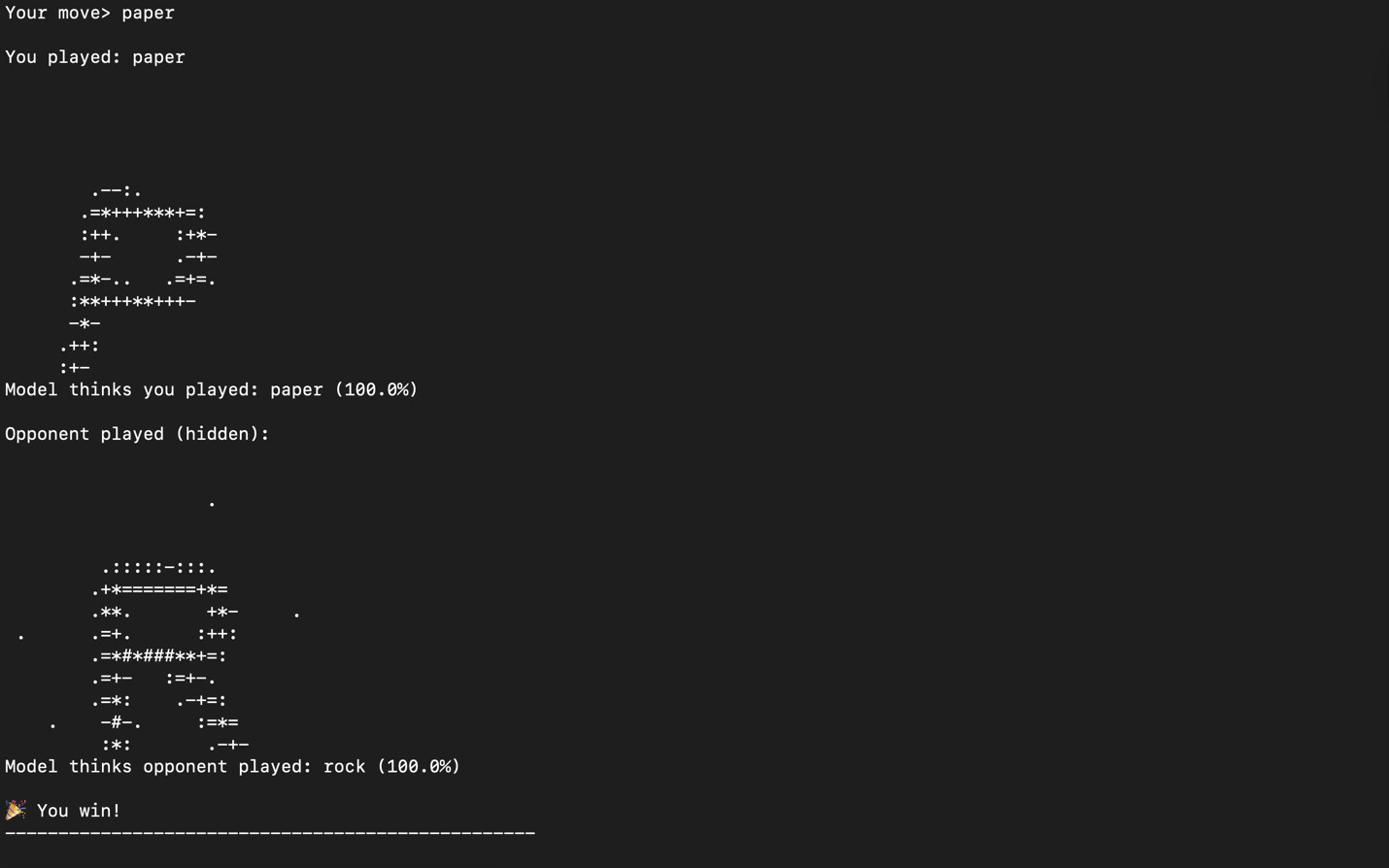
The `.pte` file is deployed on the Arm Corstone-320 FVP, a software simulation of a Cortex-M CPU paired with an Ethos-U microNPU. This allows developers to run and validate their model locally before flashing it to real hardware. The RPS game lets you play interactively in the terminal, demonstrating real-time on-device inference.
Lessons Learned
Working on this demo revealed that PyTorch’s flexibility doesn’t have to stop at the data center. ExecuTorch makes it possible to bring the same familiar PyTorch workflow to IoT sensors, wearables, and embedded devices, enabling privacy-preserving, low-power AI anywhere.
Edge AI may be small in size, but it’s huge in potential.
Try It Yourself
Learning Path: Edge AI with PyTorch & ExecuTorch – Tiny RPS on Arm Target Audience: ML developers and embedded engineers with basic PyTorch experience. Prerequisite: Introduction to TinyML on Arm
Acknowledgements
This learning path was a collaborative effort, and I owe a special thanks to the team that helped bring this course to life, including the valuable contributions of Annie Tallund, Zingo Andersen, George Gekov, Gemma Paris, Adrian Lundell, Madeline Underwood, Mary Bennion, and Fredrik Knutsson.